
Creating users in reseller hosting using DirectAdmin control panel is a fundamental task for resellers who manage multiple hosting accounts on a server. Users represent individual clients or customers who have purchased hosting services from the reseller. BDirectAdmin Web Control Panel makes it easy to create various accounts from the Admin or Reseller access level. Admins have full access to the server and can create other Admin or Reseller accounts in DirectAdmin.
In addition, resellers can create User accounts. The guide below will walk you through creating these different accounts.y creating users, resellers can allocate resources, manage accounts, and provide access to hosting features tailored to their clients’ needs. In this comprehensive guide, we’ll walk you through the process of creating users in DirectAdmin control panel, step by step:
Understanding User Creation in DirectAdmin:
User vs. Reseller:
- Reseller: A reseller is the main account holder who purchases hosting services from a hosting provider and resells them to individual clients.
- User: A user is an individual client or customer who receives hosting services from the reseller. Each user represents a separate hosting account managed by the reseller.
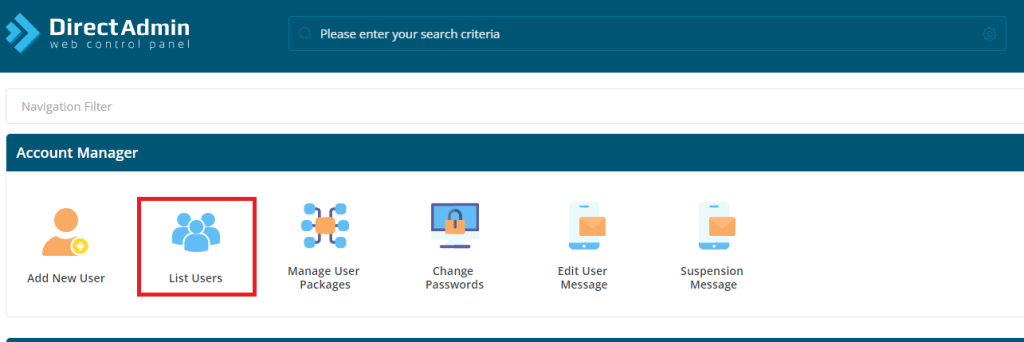
Step-by-Step Guide to Creating Users in DirectAdmin:
Step 1: Log in to DirectAdmin Reseller Panel:
- Open your web browser and navigate to the DirectAdmin reseller login page.
- Enter your reseller username and password to access the reseller control panel.
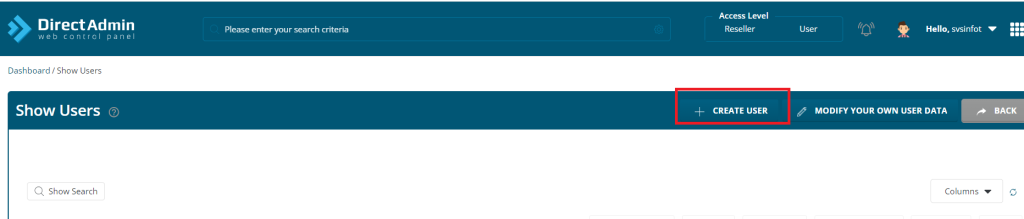
Step 2: Access the “Create User” Section:
- Once logged in, locate the section in the DirectAdmin reseller panel that allows you to create new users. This section may be labeled as “Create User,” “Account Management,” or similar.
- Click on the appropriate option to initiate the process of creating a new user.
Step 3: Enter User Details:
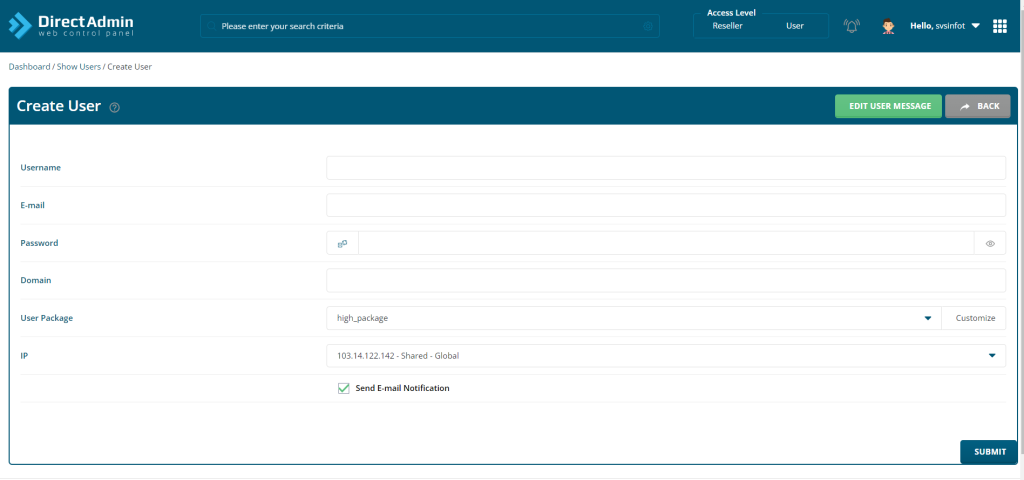
- In the “Create User” section, you will be prompted to enter various details for the new user. These details typically include:
- Username: Choose a unique username for the new user’s hosting account.
- Password: Set a secure password for the user’s account. You may have the option to generate a random password or set a custom one.
- Email Address: Provide the user’s email address for account-related notifications and correspondence.
- Domain: Specify the domain name associated with the user’s hosting account.
Step 4: Define Resource Allocations:
- Configure resource allocations for the user’s hosting account, including:
- Disk Space: Specify the amount of disk space allocated to the user’s account.
- Bandwidth: Set the monthly data transfer limit for the user’s account.
- Email Accounts: Determine the number of email accounts allowed for the user.
- Databases: Define the number of databases and database users permitted for the user’s account.
Step 5: Customize Account Settings (Optional):
- Depending on your requirements, you may have the option to customize additional settings for the user’s account, such as:
- FTP Access: Enable or disable FTP access for the user.
- Control Panel Features: Specify additional features and tools available to the user through the control panel.
- Security Settings: Configure security options, such as SSL certificates and password policies.
Step 6: Save User Details:
- Once you have entered all the required information and configured the user’s account settings, review the details to ensure accuracy.
- Click the “Create User” or “Save” button to create the user’s hosting account.
Step 7: Verify User Creation:
- After creating the user, verify that the new hosting account appears in the list of users within the DirectAdmin reseller panel.
- You can review the user’s account details, resource allocations, and other settings to confirm that the account was created successfully.
Conclusion:
In conclusion, creating users in reseller hosting using DirectAdmin control panel is a straightforward process that enables resellers to provision hosting accounts for their clients efficiently. By following the step-by-step guide outlined above, resellers can create users, allocate resources, and customize account settings to meet their clients’ specific needs. With DirectAdmin’s user-friendly interface and comprehensive features, resellers can effectively manage multiple hosting accounts, deliver exceptional service to their clients, and grow their hosting businesses with confidence.